
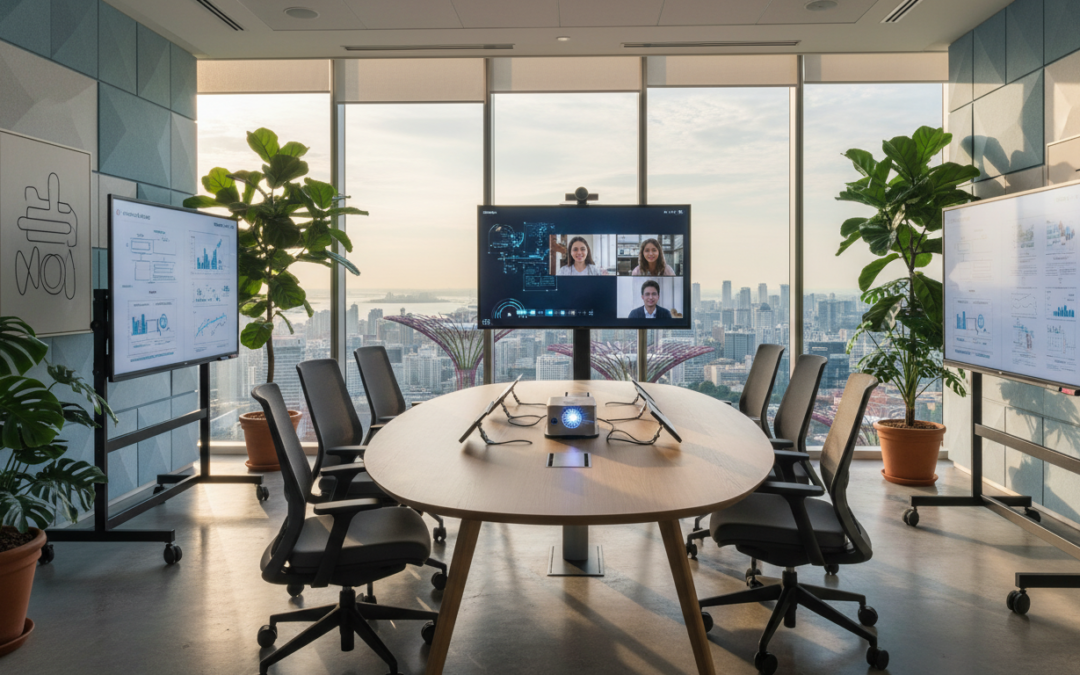
On a wet Monday morning, a small design team arrived fifteen minutes early to impress a new client. They needed a neat space, solid Wi‑Fi and a large screen. They left with a signed contract and praise for the professional setting.
This page helps busy teams compare rooms by size, check key amenities and book meeting slots fast. Choose from small huddle spaces to larger event areas with high‑speed Wi‑Fi, AV kit and flexible layouts.
We list prime locations across the CBD, Orchard Road and Marina Bay, and explain hourly and day options. Expect clear pricing, add‑on choices such as projectors, and easy online booking for last‑minute needs.
Whether you need a one‑to‑one consult, a workshop or corporate brief, these services let your business present professionally without long‑term leases. Use this guide to shortlist the right space and proceed to booking with confidence.
Key Takeaways
- Compare rooms by size and use case quickly.
- Find spaces with strong Wi‑Fi, AV and private layouts.
- Book by the hour or for the day with simple pricing.
- Prime locations across central business districts for client access.
- Flexible add‑ons available to suit events and workshops.
Professional virtual office and flexible meeting room access in Singapore
Flexible access to professional rooms helps small firms keep costs low and impressions high. This service gives teams polished spaces when a key client visit, training day or board review is on the calendar.
Who this service is for in today’s hybrid business environment
Startups managing tight cash flow, SMEs that need occasional formal rooms, consultants meeting clients and remote-first teams all benefit.
They work online most days but still require a dependable venue for milestone events and important face-to-face meetings.
What you get beyond a business address
A practical setup includes professional reception support, on-site help and quick access to well‑equipped rooms. This combination protects your brand and saves on long-term overheads.
“A short booking turned a casual pitch into a closed deal — the space made the difference.”
- Cost control: pay only for the hours you use.
- Brand assurance: quiet, private settings beats cafés.
- Coworking-adjacent support: helpful staff and basic AV without a full lease.
Next, we break down why businesses prefer hourly and day options, the types of rooms available, locations and booking steps.
Why businesses choose meeting room rental instead of long-term office leases
Choosing hourly or day hires makes it easy to align space costs with actual activity.
Cost control with pay-as-you-use hours and day bookings
Pay-as-you-use models cut fixed overheads. Companies avoid monthly rent that sits idle on weekends and public holidays.
Bookings by the hour or for a full day let small firms match spend to demand and lower upfront fit-out costs.
Professional credibility for client meetings and presentations
Well-equipped rooms include furniture, seating and AV essentials. This helps teams present professionally and close deals.
“A polished setting improves focus and client confidence.”
Scalable space for growing teams and changing needs
Start with a small room now and book larger rooms as you grow. The model supports rapid changes in headcount and agendas.
Use cases include training, interviews and private discussions that need structure beyond coworking desks.
| Option | Typical Booking | Includes | Best for |
|---|---|---|---|
| Hourly | Per hour | Seating, Wi‑Fi, screen | Short sessions, quick demos |
| Day | Full day | All-day access, AV | Workshops, training |
| Lease | Monthly | Dedicated fit-out | Permanent teams |
To compare options and book fast, see meeting room hire options.
virtual office singapore meeting room rental options for every meeting type
Match your agenda to the venue: focused calls need quiet; workshops need flexibility. Below is a quick guide to pick a space by number of attendees and purpose so you can book meeting choices with confidence.
Small rooms (1–3)
Best for one-to-one calls, quick catch-ups and focused work. These compact spaces block distractions and suit client calls when home or cafés aren’t suitable.
Mid-sized rooms (4–8)
Ideal for interviews, team discussions and brainstorms. Flexible seating and privacy help teams collaborate without interruption.
Corporate rooms (10–20+)
Designed for board decisions, training and client presentations. Expect large screens, video conferencing tools and formal layouts that project credibility.
Event spaces (20–80+)
For launches, networking and workshops. These spaces offer flexible layouts, full AV and high-speed Wi‑Fi to support larger audiences and interactive sessions.
Practical cues: choose privacy when confidentiality matters, prioritise screens/AV for presentations, and pick layout flexibility for workshops or product demos.
| Type | Capacity | Best use |
|---|---|---|
| Small | 1–3 | One-to-one calls, focused work |
| Mid-sized | 4–8 | Interviews, team discussions |
| Corporate | 10–20+ | Board meetings, training, presentations |
| Event | 20–80+ | Workshops, networking, product launches |
Next step: shortlist by format, not just capacity, then book the space that matches your agenda and tech needs for the day.
Prime Singapore locations that work for clients, teams and partners
Location shapes turnout: pick sites that minimise travel friction for attendees.
Why choice matters: a central address reduces late arrivals and makes it easier for clients and partners to accept invites.
Strategic areas: the CBD, Orchard Road and Marina Bay are credible business destinations. These locations put your offices and rooms in recognised commercial hubs.
- Proximity to MRT stations speeds local access.
- Close links to Changi Airport help overseas guests arrive on the same day.
- Central sites cut travel time, so your team uses the day more productively.
When selecting a site, consider where attendees travel from, the session type (client-facing or internal) and timetable constraints. Consistent use of a known district also strengthens your virtual office presence in correspondence and in person. Facilities, booking windows and pricing vary by location, so plan ahead.
Fully equipped meeting rooms designed for productive discussions
Professional spaces with dependable tech reduce distractions and speed decision-making.
High-speed Wi‑Fi, comfortable seating and a quiet environment
Start with reliable internet, ergonomic seating and a private environment to keep discussions focused.
These core facilities stop interruptions and help participants concentrate on outcomes.
Presentation essentials such as whiteboards, screens and TVs
Workshops and data reviews benefit from whiteboards for planning and large screens for slides and demos.
Picking a space with these amenities reduces setup time and technical delays.
Video conferencing tools for hybrid meetings and international calls
Video conferencing kits enable clear calls with remote stakeholders and support international attendance.
Good audio and camera setups protect your brand and make conferencing feel professional.
Flexible layouts for brainstorming, interviews and training sessions
Choose cabaret, classroom or boardroom arrangements to match your agenda.
Event-ready, fully equipped spaces are wise when you need microphones, projection or multi-speaker delivery.
“Confirm amenities during booking to avoid last-minute surprises and keep your agenda on track.”
- Core expectations: reliable internet, quiet environment, comfortable seating.
- Presentation-ready: whiteboards plus screens/TVs for decks and demos.
- Hybrid-ready: video and audio tools for remote calls.
- Layout flexibility: formats that suit brainstorming, interviews and training.
Options and access vary by locations and space type, so check amenities before you book to ensure smooth meetings and minimal technical delays.
Booking flexibility by the hour or for a full day
Pick the length of your booking to fit the agenda, not the other way round. Providers now offer both concise hourly options and full‑day choices to suit different schedules.
Hourly hire for quick sessions and last‑minute needs
Hourly bookings are ideal for quick client updates, brief internal reviews and urgent catch‑ups. Teams arrive to a ready space and can start on time, making paid hours count.
Full‑day booking for workshops and training
Reserve a full day when you need continuity. Workshops, training and multi‑session agendas benefit from uninterrupted access, stable AV and a comfortable layout for longer periods.
- Hourly: speed and convenience for short tasks.
- Day: comfort and continuity for longer programmes.
- Plan for set‑up, breaks and potential overruns.
Match capacity and facilities to your agenda, then book meeting slots that reflect real time needs. This flexibility helps teams use spaces and offices more efficiently while keeping plans simple.
Transparent meeting room rates, operating hours and add-ons
Knowing exact rates and opening times removes surprises on the day of your booking. Clear pricing helps you plan costs and time with confidence.
Example pricing and minimums
Starting at S$18/hour with a 2‑hour minimum at Midview City (Sin Ming). That means the smallest booking cost is S$36 before add‑ons.
Operating hours and on-site planning
Typical opening hours are 9:00 AM–6:00 PM. Arrive early to set up and allow extra time for wrap‑up. Factor in set‑up and potential overruns when you estimate total hours.
Add-ons, capacity and essentials
Projector rental is S$15 per session. Choose additional AV only when slides or demos require a large screen for training or an event.
Capacity note: fits 6–8 comfortably; 10 is possible but tight. A whiteboard and high‑speed internet are included as baseline facilities.
Parking and budgeting
Affordable on‑site parking is available, which matters for attendees who drive. To budget, total the hourly cost, add-ons and any extra hours for set‑up or delays, then confirm before you book meeting slots.
Use cases that fit startups, SMEs and remote teams
Choose spaces that solve immediate problems: client confidence, focused training and structured governance. These hire options let teams scale access without long-term leases and protect cash flow for growth.
Client meetings that protect your brand image
Small, professional spaces create trust. Book a compact room for one‑to‑one pitches or a mid-sized suite for demonstrations to clients and partners.
Training rooms for onboarding, seminars and skills workshops
Structured spaces improve participation. Choose fully equipped training rooms for onboarding, seminars and hands‑on skills workshops to keep focus and speed learning.
Boardrooms for formal decision-making and strategy sessions
Formal settings support governance. Boardrooms offer the layout and AV needed for confidential briefings, strategy reviews and director-level discussions.
Coworking-style support for teams that meet in person occasionally
For remote-first teams, coworking access gives a familiar community space for retrospectives, planning days or ad‑hoc collaboration. Book by the hour or for the day to match your agenda.
- Startups: professionalism without heavy overheads.
- SMEs: run reviews and interviews without permanent offices.
- Teams: scale room size as headcount and frequency grow.
What to expect on the day of your meeting
A seamless arrival and swift handover set the tone for productive discussions and clear outcomes. Staff usually greet your group, confirm the booking and point you to the space so the agenda can begin on time.
Check-in, room setup and presenter support
Check-in is typically quick: show your confirmation and collect any access codes. Providers allow a short buffer for set-up so your first hour is used efficiently.
Expect prepared rooms with seating, tables and a presentation surface. A standard meeting room has a screen, basic cables and clear sightlines to aid presentations.
Presenter support includes on-site assistance with screens, basic AV connections and testing. If you rely on video conferencing, ask staff to verify the feed before stakeholders join.
Creating the right environment for clients and stakeholders
Keep the space client-focused: quiet, tidy and professionally arranged. This calm environment helps partners and clients engage and trust the process.
Adopt a run-of-show mindset. Allow time for arrival, a brief setup, the agenda, short breaks and a wrap-up within your booked hours. Confirm internet access, adapters and logins before guests arrive to reduce risk.
“A well-prepared space keeps discussions focused and speeds decision-making.”
How to book a meeting room in Singapore quickly
When time is tight, a clear booking checklist helps you secure the right space fast.
Choosing the right room size, layout and facilities
Confirm the number of attendees first. Match that number to a small (1–3), mid (4–8), corporate (10–20+) or event (20–80+) option.
Pick a layout that suits the agenda: boardroom for decisions, classroom for training and flexible layouts for workshops.
Matching your booking to your agenda, group size and schedule
Check facilities next. Ensure screens, whiteboards and conferencing tools meet presentation or hybrid needs.
Plan duration by agenda blocks. Add buffer time for arrivals, set-up and possible overruns so the team can finish on time.
Instant and online booking for faster confirmations
Use instant online booking to avoid email back‑and‑forth. Fast confirmation is ideal for short‑notice slots by the hour or for the day.
- Confirm attendee number and purpose.
- Choose the room type and layout.
- Validate facilities, location and timings.
- Finalize details and book meeting slots immediately.
“Once size, location and time are set, book meeting slots to secure availability.”
Added value when meeting rooms are paired with virtual office services
Pairing a professional mailing address with on-demand rooms creates a practical, polished setup for growing businesses.
Consistency of location and a professional business presence
Using the same address for correspondence and in-person sessions builds trust. Clients recognise the location and are less likely to be confused by different meeting sites.
That steady presence supports brand credibility when people arrive for pitches, reviews or sign-offs.
Client-facing support that complements your setup
Providers often add reception help, directional guidance and light AV assistance. These services keep arrivals smooth and let hosts focus on the agenda.
Such support is a simple but powerful differentiator that improves visitor experience and reflects well on your business.
| Benefit | What it delivers | When to use |
|---|---|---|
| Consistent address | Clear correspondence and client directions | Client pitches, contract signings |
| On-demand access | Rooms by the hour or day without long leases | Interviews, workshops, demos |
| Client support | Reception, setup and visitor handling | High-stakes meetings and events |
| Scalable use | Increase frequency as needs grow | Growing teams and recurring sessions |
This balanced model blends remote efficiency with occasional in-person sessions. For more on selecting a reliable solution that pairs address services with access to spaces, see what makes a good virtual office.
Conclusion
Finish by matching your agenda to a space that supports outcomes, not distractions. Professional meeting rooms across prime locations give teams flexible hourly or day booking, reliable Wi‑Fi, presentation kit and video options to keep sessions productive.
Pick by the number of attendees, the purpose — meetings, training or an event — and the AV you need. Factor in location and total hours so the day runs to plan.
Shortlist a room type, confirm facilities and timing, then book meeting space online for fast confirmation. For a central CBD option, consider One Raffles Place to simplify access and client turnout.
Pairing meeting access with a virtual office strengthens presence, improves client experience and helps teams collaborate as needs evolve.
FAQ
Who is this service aimed at in today’s hybrid business environment?
What do I get beyond a business address?
Why choose meeting room hire instead of a long-term lease?
How does pay-as-you-use pricing help control costs?
What sizes of rooms are available for different meeting types?
What equipment and amenities are provided?
Can I book by the hour or for a full day?
What are typical rates and are there extra charges?
Where are prime locations usually situated?
Is on-site parking available for attendees?
What should I expect on the day of my booking?
How do I choose the right room size and layout?
Can I book instantly online?
How do meeting rooms support hybrid meetings and international calls?
What added value comes from pairing these spaces with business presence services?
Are training rooms available for onboarding and seminars?
How do providers handle AV requirements like projector rental?

A Singapore-based B2B growth expert, Dean Cheong leads VOffice as CEO, helping organizations grow faster through structured sales execution, CRM transformation, and market expansion strategies. Backed by formal training in finance and business banking from Nanyang Technological University, he focuses on building performance-driven systems that support long-term commercial success.